
Download Eye Chart – Eye Care Professionals, Visual Acuity Testing, Optometry Tool, Android App
Overview
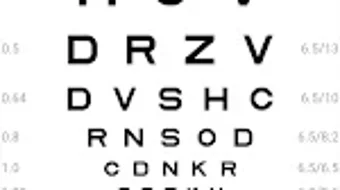
Eye Chart for Eye Care Professionals is a dedicated Android application designed to support visual acuity testing in clinical and field settings. The software enables eye care professionals to conduct accurate visual acuity assessments without relying on traditional printed charts. It is intended for use in diagnosing and monitoring visual performance, particularly in patients requiring routine eye evaluations.
The app supports flexible configuration to accommodate varying testing environments, including mobile clinics, remote locations, or private practices. Its primary function is to deliver standardized optotype displays that align with established testing protocols, such as ETDRS. The tool is especially useful for practitioners seeking a portable, reliable, and customizable alternative to physical eye charts.
While the developer, Qiang Ye, is identified, no additional information about the company or development background is available. Real-world usage scenarios include patient screenings, vision assessments during health fairs, or follow-up evaluations in outpatient settings. The app is designed to be used in both professional and educational contexts, supporting both clinical workflows and learning activities related to optometry.
Key Features & Capabilities
- Customizable Optotype Selection: Users can choose from multiple optotype types, including E, C, Sloan, and Picture formats, allowing for tailored testing based on patient age, literacy, or clinical needs.
- Dynamic Calibration Based on Test Distance: The app enables calibration of optotype size according to the specific test distance, supporting ranges from 30 cm to 20 feet with adjustable units (meters, feet, centimeters, inches).
- Flexible Display Modes: Multiple display configurations are available—full display, horizontal, vertical, and cross layouts—offering adaptability for different testing setups and patient comfort.
- Scenario Saving and Recall: Users can save frequently used settings as predefined scenarios, streamlining the process for repeat testing and reducing setup time.
- Visual Acuity Record Management: The app allows users to record and store patient-specific visual acuity results, supporting longitudinal tracking of vision changes.
- Integrated ETDRS Chart Support: The inclusion of the ETDRS (Early Treatment Diabetic Retinopathy Study) chart ensures compatibility with standardized clinical protocols used in research and advanced eye care.
These features collectively enhance the usability and clinical relevance of the application. For example, a practitioner conducting mobile eye screenings can quickly configure the app for a 6-meter test distance using metric units, select the E optotype, and save the setup as a scenario for future use. Similarly, a pediatric optometrist might opt for the Picture format and a vertical layout to engage younger patients. The ability to manage records supports ongoing patient care and documentation, making the app suitable for both routine and specialized testing environments.
User Interface, Workflow & Performance
The user interface is structured around intuitive navigation, allowing users to access key functions through clearly labeled menus and settings. Core actions—such as selecting optotypes, setting test distance, and saving configurations—are accessible via a streamlined workflow. The app’s design prioritizes clarity and ease of use, minimizing the need for technical expertise.
Users can adjust parameters in real time, with immediate visual feedback on the display. The workflow supports a logical sequence: configure settings → initiate test → record results → save or export data. While the developer did not specify resource usage details, the app’s size of 12.4 MB suggests a lightweight footprint, which typically correlates with efficient memory and CPU handling.
Performance observations are based on general software behavior patterns for mobile applications of similar scope. Stability is expected to be consistent given the app’s focused functionality and absence of complex background processes. No performance bottlenecks or crashes were reported in the available information.
The app appears to operate smoothly during standard use, though real-world stress testing was not provided.
Compatibility & System Requirements
Eye Chart for Eye Care Professionals is designed for Android operating systems. The app is compatible with devices running Android 5.0 or later, though specific version compatibility was not explicitly stated. Installation requires approximately 12.4 MB of storage space, which is minimal and suitable for most modern Android devices.
The developer did not provide additional system requirements such as RAM, CPU specifications, or screen resolution thresholds. Compatibility information was partially provided, with the OS and file size clearly listed. Users are advised to ensure their device meets basic Android functionality standards to run the application.
No information was shared regarding support for tablets, wearables, or other form factors. The app’s reliance on screen-based optotypes means that display quality and brightness may influence test accuracy, though no calibration guidance for screen settings was included.
Pros and Cons
Pros
- Free to download and use with no hidden costs
- Supports multiple optotype types for diverse patient populations
- Highly customizable test distance and display layout
- Includes ETDRS chart for standardized clinical use
- Allows saving of configurations and visual acuity records
- Lightweight size (12.4 MB) suitable for low-storage devices
Cons
- Only available on Android; no support for iOS or desktop platforms
- No information on hardware or RAM requirements
- Record management features may lack advanced export or sharing options
- No mention of cloud sync or backup functionality
- Limited to mobile device use, restricting deployment in multi-device environments
FAQ Section
Is Eye Chart for Eye Care Professionals available on iOS?
The app is currently only available on Android devices. There is no information on future iOS support.
Can I use this app offline?
Yes, the app does not require an internet connection to perform visual acuity tests or access saved configurations.
Is the app safe to use for clinical purposes?
While the app is designed for professional use, users should validate its performance against established standards in their clinical environment. The developer encourages feedback for improvements.
How often are updates released?
Information about update frequency was not provided. Users should check the app store for the latest version.
What type of license does the app use?
The app is free to download and use. No formal licensing details were specified by the developer.
Final Thoughts + CTA
Eye Chart for Eye Care Professionals delivers a focused, functional solution for visual acuity testing in mobile and clinical settings. Its ability to calibrate optotype size based on test distance, support multiple chart formats, and integrate ETDRS standards makes it a valuable asset for eye care practitioners. The app’s lightweight design and intuitive interface ensure accessibility across a range of Android devices.
While it lacks cross-platform availability and advanced data-sharing features, its core functionality is well-executed and purpose-built. Professionals seeking a reliable, free, and customizable eye chart tool will find this app to be a practical addition to their toolkit. For those in optometry, ophthalmology, or vision science, the app offers a modern, efficient alternative to traditional testing methods.
Download Eye Chart now and enhance your patient evaluation process with a tool designed for precision and portability.





.png)

